


Betting texts shouldn’t fill your inbox.

Sivorixa checks SMS messages for betting and scam signals on your iPhone. No account to create, and your messages stay on your device.

Free on the App Store. Plus is optional.

A shield inside a speech bubble; a message is sorted into one of four folders on the right.

The shield sorts your messages

As you scroll, fictional messages reach the shield and go to their folder.

  1. Spam A message with betting or scam signals is sorted into Spam.EXAMPLEBET: Your trial bonus is waiting! Sign up now.
  2. Promotions A store promotion goes to Promotions.EXAMPLE STORE: A weekend discount on selected products.
  3. Transactions An account or transaction notice goes to Transactions.EXAMPLE BANK: A purchase of 120.00 TL was made with your card.
  4. Inbox An ordinary message from a person stays in your Inbox.Personal number: Free tonight?
  • Messages are checked on your device
  • No account, no data collected
  • Turkish and English interface

Set up in three steps.

You choose the filter in iOS. Sivorixa cannot make or read that selection for you.

  1. Get the app

    Install Sivorixa from the App Store. The setup guide in the Shield tab shows where to tap in Settings, with pictures.

  2. Select it as your filter

    In Settings › Messages › Unknown Senders, choose Sivorixa as the message filter. Labels vary by iOS version; the guide covers each one.

  3. Confirm your choice

    Return to the app and confirm “I selected Sivorixa.” From then on, new SMS and MMS from senders outside your contacts are evaluated.

Step by step: how to block betting texts on iPhone

Not every message goes to the same folder.

A betting ad goes to Spam. Store and bank promotions go to Promotions, a separate folder; account notices go to Transactions. Pick one of the fictional messages below.

Folder in Messages: Spam

Sorted as a betting ad.

Why?

  • A bonus and a sign-up call appear together
  • Phrases that carry betting context
  • You can also block the sender yourself in Rules

Fictional examples for illustration, not live filtering results. Outcomes depend on your settings and personal rules.

Keep it simple. Stay in control.

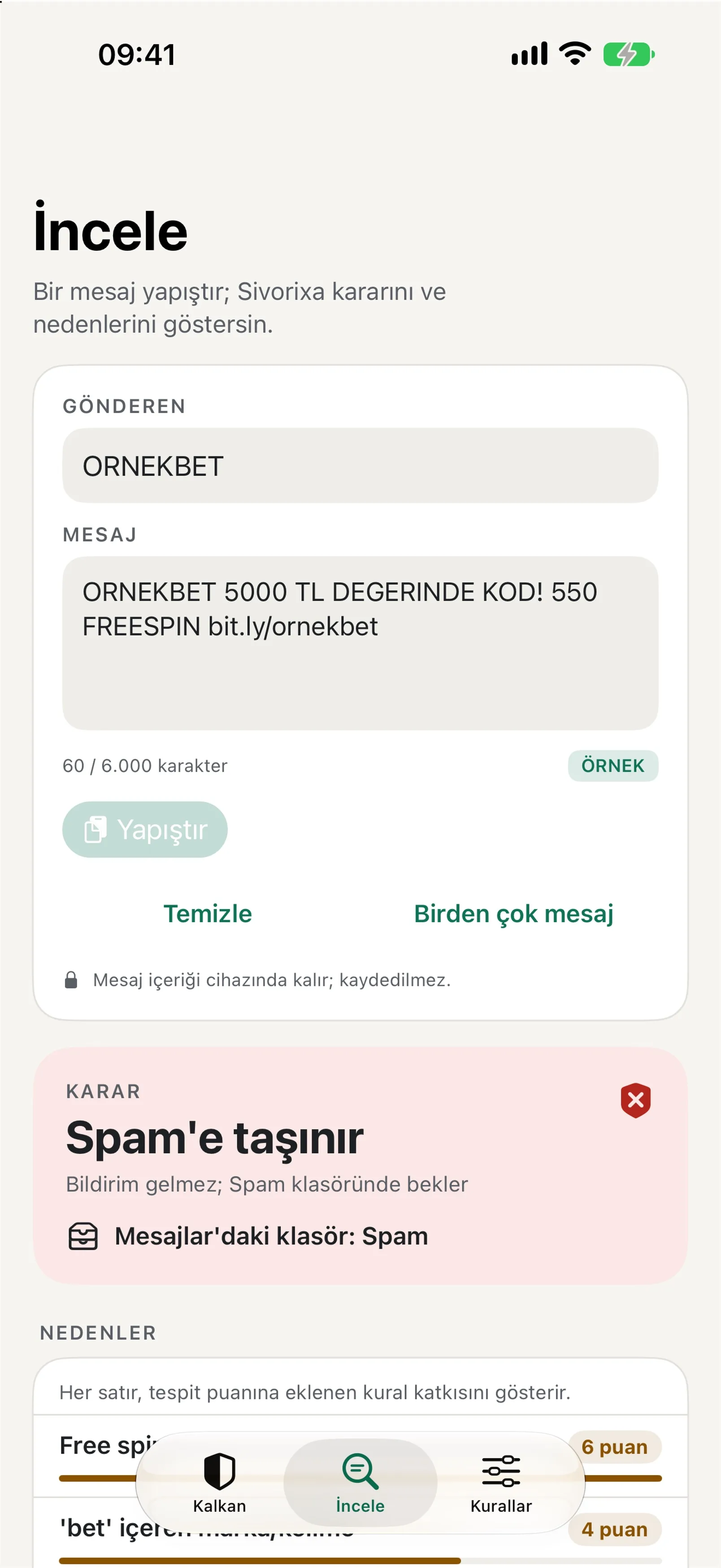
The Inspect screen in the Sivorixa app: a sample message and the reasons behind the result
Example screen from the app, shown in Turkish. The message is fictional.

Wrong folder?

Paste a message in Inspect and choose the right folder: Inbox, Transactions, Promotions or Spam. The sender’s later messages go there. iOS does not let apps move a message that already arrived; your choice is saved only in rules on your phone.

Inspect

Paste a message and see which phrases influenced the result. The text is processed on your device and not saved.

Your own rules

Add trusted senders to the allow list and unwanted ones to the block list. The free version has three items per block and folder list; the allow list is unlimited.

Promotion sorting

Store and bank promotions don’t get mixed up with betting ads; they are sorted into Promotions.

Shortcuts and Siri

Send a message to Sivorixa through Shortcuts for a quick check. With Plus, you can turn Attack Shield on and off from Control Center (iOS 18 and later), Siri and Shortcuts.

Is the filter working?

Look under Messages › Filters: once you select Sivorixa, texts from senders outside your contacts are sorted there. iOS does not let filters pass information to the app, so the app cannot count sorted messages. Inspect shows why a message would be sorted.

Light, dark or system

The app follows your iOS appearance, or you can choose light or dark.

Turkish and English

The interface comes in both languages. The rules focus especially on Turkish betting and scam patterns.

Your message stays on your device. So does the analysis.

Sivorixa asks for no account and does not collect your name, number, location or contacts. Each message is scored with the rule file on your phone.

  • Your SMS content is not sent to Sivorixa servers or to third parties.
  • The app has no advertising, analytics or tracking software. This site sets no cookies; how visits are counted is on the privacy page.
  • Only a signed rule file may be downloaded; that request carries no message, number or device identifier.

Read the privacy policyYour choices and rights

The core is free. Plus adds more.

The betting and scam filter, promotion sorting, Inspect and Shortcuts are free. Plus is for people who want finer control over filtering.

Prices are shown in the App Store.

Plus Monthly

Renews monthly.
Prices are shown in the App Store.

Plus Lifetime

Pay once, keep it.
Prices are shown in the App Store.

Free

  • Betting and scam filter
  • Promotion sorting
  • Inspect, and checking a message with Shortcuts
  • Three items per block and folder list; the allow list is unlimited
  • Folder corrections
  • Weekly rule check
  • Setup guide and troubleshooting

Plus adds

  • Aggressive mode: sorts on fewer signals, so some normal messages may be sorted too
  • Night mode: stricter filtering from 22:00 to 08:00
  • Attack Shield: strictest protection for 24 hours during a spam wave
  • Foreign-number filter: except senders on your allow list
  • Daily rule check
  • Attack Shield from Control Center (iOS 18 and later) and Shortcuts
  • Regular expression rules and unlimited personal lists

Purchases are made only inside the app, through the App Store; this website takes no payments. Not every account is eligible for a trial. Apple shows the current price, duration and renewal terms before you buy. Cancel any time in Settings › Apple Account › Subscriptions.

Common questions

More answers are on the support page.

Your inbox is yours.

Free on the App Store for iPhone.

Download on the App Store

Support page